
Lorsque notre équipe d'ingénierie teste teste de nouveaux octocoptères 1 de nouveaux octocoptères dans notre installation de Xi'an, nous constatons souvent la frustration des clients lorsqu'ils réalisent que leurs coûteux systèmes matériels enferment des données précieuses dans des systèmes propriétaires. Vous ne pouvez tout simplement pas vous permettre de perdre des données de mission critiques après une opération d'incendie à enjeux élevés parce que le système manque d'une fonction d'exportation appropriée.
Pour confirmer l'exportabilité du journal de vol, demandez une démonstration en direct du flux de travail et demandez des exemples de fichiers dans des formats universels tels que CSV ou GPX. Vous devez vérifier si l'extraction des données nécessite un accès Internet ou peut être effectuée hors ligne via USB, en garantissant la compatibilité avec votre logiciel d'analyse. logiciels SIG 2.
Voici les questions spécifiques que vous devez poser pour vous assurer que vous contrôlez vos données.
Quels formats de fichiers dois-je vérifier pour m'assurer que les journaux de vol sont compatibles avec mes outils d'analyse ?
Nous concevons nos contrôleurs de vol pour capturer des milliers de points de données par seconde, mais nous savons que les données binaires brutes données binaires 3 les données sont inutiles pour un responsable des achats qui a besoin de rapports d'incidents clairs. Si les fichiers que nous générons ne correspondent pas à votre logiciel SIG logiciels SIG 4, votre analyse post-mission sera dans une impasse.
Vous devez vérifier que le drone exporte les journaux dans des formats non propriétaires tels que CSV pour l'analyse de télémétrie et KML, GPX ou GeoJSON pour la cartographie. Ces types de fichiers universels garantissent une intégration transparente avec les logiciels SIG tiers et les outils de reporting d'incidents sans nécessiter de logiciel de conversion spécialisé du fournisseur.

Lorsque vous évaluez un octocoptère de qualité professionnelle, les données brutes doivent être utilisables immédiatement après l'atterrissage du drone. De nombreux fabricants utilisent des formats binaires cryptés (souvent avec des extensions telles que .dat ou .bin) pour protéger leurs algorithmes de contrôle propriétaires. Bien que cela soit standard pour les diagnostics internes, cela crée une barrière importante pour votre équipe si vous avez besoin de superposer une trajectoire de vol sur une carte du périmètre de l'incendie. carte du périmètre de l'incendie 5.
Vous devriez insister pour voir un menu d'exportation qui propose des normes universelles. Par exemple, dans les opérations de lutte contre les incendies, la possibilité d'exporter un KML ou GPX fichier est non négociable. Ces fichiers permettent à vos commandants d'intervention de télécharger la trajectoire de vol du drone directement dans des outils de cartographie tels que Avenza Maps ou Google Earth. Cela aide à tracer exactement où le drone a volé et où des points chauds ont été détectés. Si le fournisseur ne propose qu'un “visualiseur de vol” propriétaire au sein de sa propre application, vos données restent isolées et difficiles à partager avec d'autres agences.
De plus, pour une analyse détaillée des performances, vous avez besoin de CSV fichiers (valeurs séparées par des virgules). Un fichier CSV organise chaque lecture de capteur — tension de la batterie, altitude, coordonnées GPS et vitesse du moteur — dans une simple feuille de calcul. Cela permet à vos responsables de la sécurité d'auditer les vols à l'aide de logiciels standard tels qu'Excel ou d'outils spécialisés de gestion de flotte tels qu'AirData.
Formats de données courants et leurs cas d'utilisation
Nous avons compilé un tableau montrant les formats standard que vous devriez demander lors de votre processus d'approvisionnement pour garantir une interopérabilité complète.
| Extension de fichier | Type de format | Cas d'utilisation principal en lutte contre les incendies | Compatibilité |
|---|---|---|---|
| .CSV | Données tabulaires | analyse détaillée de la télémétrie, audit de l'état de la batterie et rapports d'incident. | Universel (Excel, AirData, DroneLogbook) |
| .GPX | Échange GPS | Visualisation des trajectoires de vol et des points de cheminement sur les appareils GPS et les cartes topographiques. | Élevé (Garmin, Avenza, Logiciels SIG) |
| .KML / .KMZ | Markup Keyhole | Superposition de la thermique vidéo thermique 6 des itinéraires d'inspection sur Google Earth ou des modèles de terrain 3D. | Élevé (Google Earth, ArcGIS) |
| .DAT / .BIN | Binaire propriétaire | Enquête médico-légale approfondie sur les accidents par le fabricant (nous). | Faible (Nécessite un logiciel du fournisseur) |
Le risque des convertisseurs propriétaires
Certains fournisseurs pourraient vous dire : “ Ne vous inquiétez pas, nous avons un outil PC qui convertit les journaux. ” Soyez prudent ici. Si cet outil logiciel est abandonné ou ne fonctionne pas sur les ordinateurs sécurisés de votre service, vos données deviennent inaccessibles. Exigez toujours des capacités d'exportation directe depuis le drone ou le contrôleur.
Le fournisseur peut-il fournir un SDK ou une interface API pour la transmission et l'intégration de données de vol en temps réel ?
Nos développeurs de logiciels travaillent fréquemment avec des intégrateurs qui constatent qu'un système fermé les empêche de diffuser des vidéos thermiques vitales vers le centre de commandement. Si vous ne pouvez pas personnaliser le flux de données du drone vers votre siège, votre efficacité opérationnelle en souffre considérablement.
Oui, un fournisseur doté de solides capacités de R&D devrait proposer une API ouverte ou un SDK mobile. Ces interfaces permettent à votre équipe informatique de créer des intégrations personnalisées qui transmettent la télémétrie en temps réel, les flux vidéo et les données thermiques directement dans vos tableaux de bord de centre de commandement existants ou vos logiciels de gestion des incendies.

Dans la lutte moderne contre les incendies, un drone est rarement un outil autonome ; c'est un nœud dans un réseau plus large. 10. Ce document explique comment vos autres systèmes logiciels peuvent communiquer avec le drone. Sans cela, vous ne pourrez pas intégrer le drone avec de futurs logiciels de commande. N'acceptez pas un manuel d'utilisation générique. Vous avez besoin de la « documentation SDK » technique qui permet à votre équipe informatique ou à des développeurs tiers d'écrire de nouvelles commandes si nécessaire. 7 Lorsque vous posez des questions sur un SDK (Software Development Kit) ou une API (Application Programming Interface), vous demandez les clés pour intégrer le drone dans le système numérique de votre département. signatures numériques 8 écosystème. Un drone “ fermé ” oblige le pilote à regarder l'écran de la télécommande, tandis qu'un drone “ ouvert ” peut envoyer ces données en direct sur un grand écran dans le centre de commandement mobile.
Un SDK permet essentiellement à vos développeurs (ou à des partenaires logiciels tiers comme DroneSense) d'écrire des applications qui s'exécutent sur la télécommande du drone. Ceci est crucial pour automatiser des missions spécifiques, telles qu'un schéma de recherche en grille au-dessus d'un incendie de forêt. Sans SDK, vous êtes limité aux fonctionnalités génériques que le fabricant a décidé d'inclure.
Un API, quant à elle, est généralement utilisée pour les flux de données. Par exemple, si vous disposez d'un système centralisé de gestion des incidents, une API permet au drone de pousser les niveaux de batterie en direct, la localisation GPS et les alertes thermiques vers ce système via Internet. Cela offre au commandant des opérations une conscience situationnelle totale Commandant des opérations 9 sans avoir besoin de demander par radio au pilote toutes les deux minutes une mise à jour du statut.
SDK vs API : Que demander ?
Comprendre la différence vous aide à rédiger de meilleures exigences d'appel d'offres. Voici une ventilation de ce que chaque interface permet pour votre flotte.
| Fonctionnalité | Capacités du SDK mobile | Capacités de l'API Cloud |
|---|---|---|
| Fonction principale | Contrôlez le drone et le matériel de la charge utile via une application personnalisée. | Accéder et extraire des données du serveur cloud. |
| Contrôle en temps réel | Oui (par exemple, automatiser un scan de périmètre). | Non (principalement pour la lecture de données). |
| Accès aux données | Flux vidéo en direct, télémétrie pendant le vol. | Journaux post-vol, enregistrements de vol synchronisés. |
| Exigence | Nécessite un développement sur le contrôleur à distance (Android/iOS). | Nécessite une connexion Internet pour synchroniser les données. |
Si le fournisseur hésite lorsque vous mentionnez les SDK ou facture des frais exorbitants pour l'accès, c'est un signal d'alarme. Cela suggère que son système est rigide et pourrait ne pas s'adapter aux futures technologies de lutte contre les incendies.
Comment puis-je vérifier que les processus de stockage et d'exportation des données du drone sont conformes à mes protocoles de sécurité ?
Nous avons récemment traité une commande personnalisée pour une agence européenne qui a refusé de finaliser le contrat tant que nous n'avions pas prouvé qu'aucune donnée ne toucherait jamais un serveur cloud public. La sécurité n'est pas seulement une fonctionnalité ; c'est une nécessité lorsque vous cartographiez des infrastructures critiques ou enquêtez sur des cas d'incendie criminel sensibles.
Vérifiez que le drone prend en charge la récupération de données isolée du réseau via des ports physiques tels que USB-C ou des cartes SD sans synchronisation cloud. Renseignez-vous sur les normes de chiffrement AES-256 et demandez une garantie écrite que vous détenez les clés de déchiffrement, garantissant ainsi aucun accès à distance non autorisé à vos données de mission sensibles.
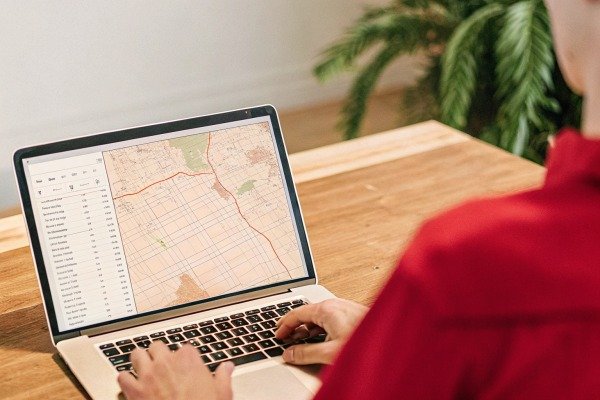
La souveraineté des données est une préoccupation majeure pour les entités gouvernementales. De nombreux drones grand public synchronisent automatiquement les journaux de vol avec le serveur cloud du fabricant dès que le contrôleur se connecte au Wi-Fi. Pour un service d'incendie gérant des enquêtes sensibles, c'est inacceptable. Vous devez vérifier que le drone offre un “ Mode de données local ” ou un véritable mode de fonctionnement hors ligne.
La référence en matière de vérification est le Test d'isolement du réseau. Demandez au fournisseur d'effectuer un vol et d'exporter les données pendant que l'appareil est complètement déconnecté d'Internet. Si le système force une connexion ou ne parvient pas à générer un fichier journal sans handshake serveur, il n'est pas suffisamment sécurisé pour un travail gouvernemental sensible. L'exportation doit être physique, via une clé USB ou une carte SD cryptée.
Liste de contrôle de vérification de la sécurité
Utilisez cette liste de contrôle lors de votre réunion avec le fournisseur pour vous assurer que ses protocoles de sécurité correspondent aux exigences de votre agence.
| Fonctionnalité de sécurité | Pourquoi c'est important | Méthode de vérification |
|---|---|---|
| Mode de données locales | Empêche le téléchargement automatique des trajectoires de vol sensibles. | Testez l'exportation avec le Wi-Fi/cellulaire désactivés. |
| Chiffrement AES-256 | Protège les données si le drone est perdu ou volé. | Examinez la fiche technique pour le "Cryptage des médias". |
| Anonymisation des journaux | Masque l'identité du pilote dans les fichiers exportés. | Vérifiez le menu des paramètres pour les options "Anonymiser les données". |
| Chaîne de possession | Garantit que les journaux sont admissibles devant les tribunaux. | Demandez si les journaux ont des signatures numériques ou des sommes de contrôle. |
L'importance des signatures numériques
Pour les enquêtes sur les incendies criminels, le journal de vol constitue une preuve. Si un fichier peut être facilement modifié dans un éditeur de texte pour changer l'horodatage GPS, il pourrait être rejeté par le tribunal. Les fournisseurs haut de gamme fournissent des journaux “immuables” ou des signatures numériques qui prouvent que les données n'ont pas été falsifiées depuis le moment où elles ont été enregistrées. Demandez toujours si leur format d'exportation prend en charge ce niveau d'intégrité.
Les données du journal de vol exportées aideront-elles le fabricant à fournir un meilleur support technique à distance en cas de problèmes ?
Notre équipe de support à Chengdu résout près de 90% des tickets techniques en analysant les journaux de vol envoyés par les clients, plutôt que de leur demander de renvoyer le drone. Sans ces journaux détaillés, le dépannage d'une anomalie moteur devient un jeu de devinettes qui gaspille votre temps et votre budget.
Absolument, les journaux exportés sont la boîte noire des opérations de drones. Ils fournissent à notre équipe d'ingénierie des points de données critiques tels que le régime moteur, les courbes de tension de la batterie et l'état des capteurs, nous permettant de déterminer la cause exacte d'un dysfonctionnement et de fournir des solutions à distance précises immédiatement.
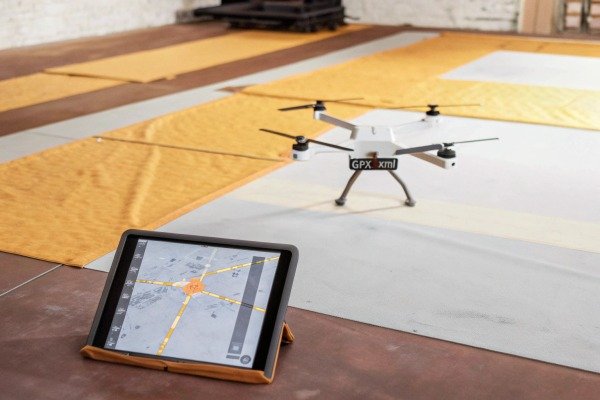
Lorsqu'un drone se comporte de manière imprévisible — peut-être qu'il a dérivé légèrement pendant un vol stationnaire ou que la batterie s'est vidée plus rapidement que prévu — ce n'est rarement un mystère pour la machine. Le contrôleur de vol enregistre la “ santé ” du système toutes les quelques millisecondes. En exportant ces journaux et en nous les envoyant, vous permettez à nos ingénieurs d'effectuer une autopsie virtuelle du vol.
Par exemple, si vous signalez que le drone vibre, nous pouvons examiner les données de l'IMU (Unité de Mesure Inertielle) Unité de mesure inertielle 10 dans le journal. Si nous constatons un pic de fréquence spécifique, nous pouvons vous dire exactement quelle hélice est déséquilibrée ou quel roulement de moteur s'use. Cette capacité transforme une boucle de réparation potentielle de deux semaines en une correction par e-mail de cinq minutes.
Points de télémétrie clés pour le diagnostic
Pour vous assurer que le fournisseur peut réellement vous aider, demandez-lui de vous montrer un exemple de “ Rapport de santé ” généré à partir d'un journal. Il doit contenir les métriques critiques suivantes :
- Tension de la batterie au niveau de la cellule : Pas seulement le pourcentage total, mais la tension de chaque cellule individuelle. Cela permet d'identifier un bloc-batterie défectueux avant qu'il ne provoque une panne de courant en plein vol.
- PWM (Modulation de largeur d'impulsion) du moteur : Cela montre la puissance de travail de chaque moteur. Si un moteur travaille 20% plus dur que les autres pour maintenir un vol stationnaire, cela indique un déséquilibre matériel.
- Interférences de boussole et de GPS : Les journaux doivent afficher des " erreurs d'innovation " qui indiquent si le drone se battait contre des interférences magnétiques, vous aidant à identifier des lieux de décollage sûrs.
Si le fournisseur dit : “ Nous n'avons pas besoin de journaux, envoyez juste une vidéo ”, méfiez-vous. L'équipement industriel professionnel repose sur des données, pas sur des suppositions visuelles. Les exportations de journaux de haute qualité sont le moyen le plus rapide de remettre votre appareil en vol.
Conclusion
La confirmation des capacités de journal de vol n'est pas seulement une formalité technique ; elle est essentielle à votre sécurité opérationnelle et à votre maintenance à long terme. En exigeant des formats universels comme CSV et GPX, en vérifiant les flux de travail d'exportation hors ligne et en garantissant un accès approfondi à la télémétrie pour le support, vous protégez l'investissement de votre agence. Demandez toujours une “ démo de données ” avant de signer le bon de commande.
Notes de bas de page
1. Entrée Wikipedia expliquant la configuration et l'utilisation des drones multirotors octocoptères. ︎
2. L'organisme de normalisation responsable de l'interopérabilité des données géospatiales et des normes SIG. ︎
3. Contexte général des formats de données binaires et de leur rôle en informatique. ︎
4. Définition officielle par le gouvernement des systèmes d'information géographique. ︎
5. Lignes directrices de l'industrie pour la cartographie des périmètres d'incendie. ︎
6. Guide technique sur la technologie de l'imagerie thermique et ses applications dans des contextes professionnels. ︎
7. Aperçu technique de la manière dont les API facilitent l'intégration des données entre les systèmes. ︎
8. Explication de la cybersécurité gouvernementale sur les signatures numériques pour l'intégrité des données. ︎
9. Définition officielle du rôle de commandant des incidents par la FEMA. ︎
10. Aperçu technique de la technologie IMU utilisée dans le contrôle de vol. ︎


 English
  Español de México
  Deutsch
  Français
  Русский
  العربية
Comments
No comments yet. Be the first to share your thoughts!
Leave a Comment