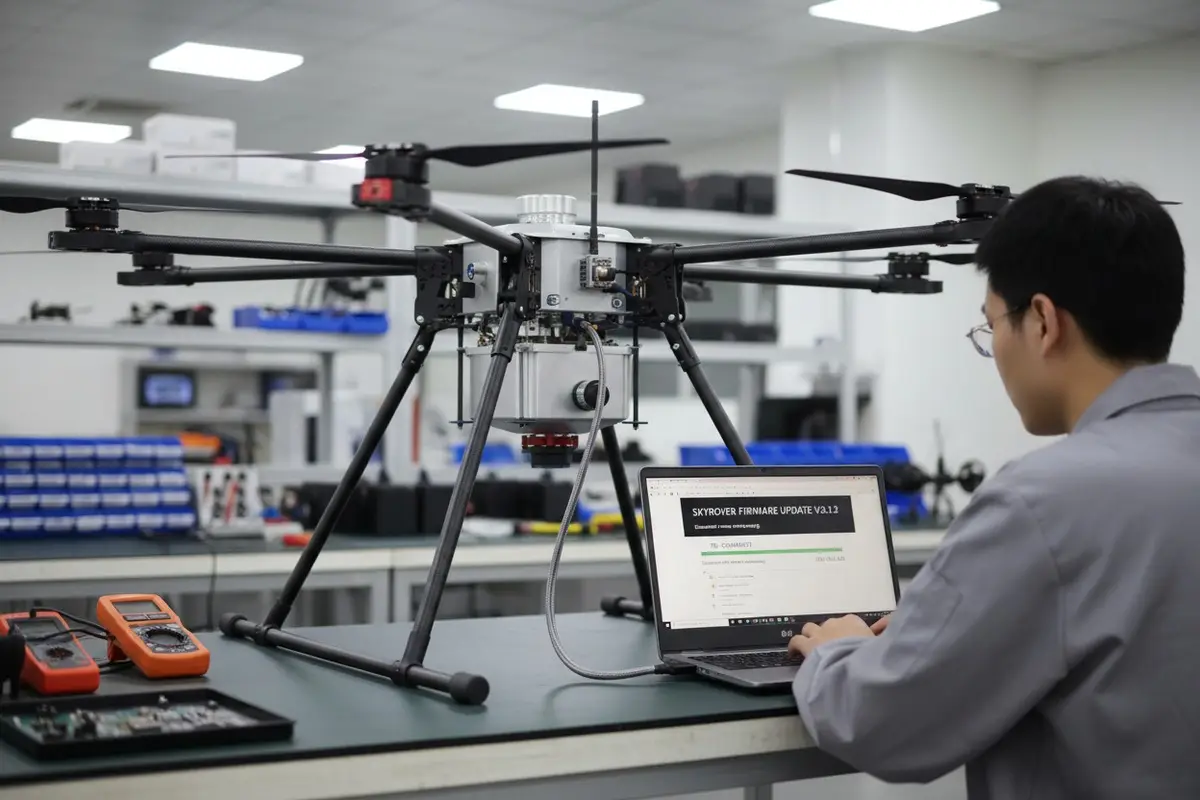

Während der Produktionstests in unserer Anlage stellen wir fest, dass Firmware-Updates häufiger fehlschlagen, als die meisten Käufer erwarten Firmware-Update-Fehler 1. Ein einziges unterbrochenes Update kann ein einwandfrei funktionierendes Gerät landwirtschaftliche Drohne 2 in ein teures Briefbeschwerer verwandeln. Für Importeure, die Flottenbereitstellungen auf abgelegenen Bauernhöfen verwalten, vervielfacht sich dieses Risiko mit jeder Einheit in Ihrem Bestand.
Firmware-Update-Fehler bei Agrardrohnen resultieren typischerweise aus niedrigem Batteriestand, instabilen Netzwerkverbindungen oder unterbrochenen Prozessen. Um diese Fehler zu beheben und betroffene Einheiten zu reparieren, halten Sie den Batterieladestand über 50 %, verwenden Sie offizielle Wiederherstellungstools wie die Herstellersoftware und richten Sie klare technische Supportkanäle mit Ihrem Lieferanten ein, bevor Sie Großbestellungen aufgeben.
Diese Anleitung führt Sie durch Verifizierungsschritte vor der Bestellung, bewährte Wiederherstellungstechniken und Strategien zur Minimierung von Ausfallzeiten, wenn Firmware-Probleme Ihre Flotte betreffen.
Wie kann ich überprüfen, ob mein Drohnenlieferant robuste Firmware-Wiederherstellungstools anbietet, bevor ich eine Großbestellung aufgeben?
Wenn wir Drohnen an nordamerikanische Distributoren liefern, ist die erste Frage erfahrener Käufer nach dem technischen Support nach dem Verkauf PC-basierte Assistentensoftware 3. Kluge Einkaufsmanager wissen, dass Firmware-Probleme irgendwann auftreten werden. Die Frage ist, ob Ihr Lieferant Ihnen helfen kann, diese schnell zu lösen.
Fordern Sie vor der Aufgabe einer Sammelbestellung die Dokumentation des Firmware-Wiederherstellungstools des Lieferanten an, verifizieren Sie, dass sie PC-basierte Assistentensoftware bereitstellen, bestätigen Sie die Verfügbarkeit von Offline-Update-Methoden über SD-Karte und erfragen Sie deren durchschnittliche Reaktionszeit für technische Support-Tickets im Zusammenhang mit Brick-Vorfällen.

Wichtige Fragen an Ihren Lieferanten
Beginnen Sie Ihren Verifizierungsprozess mit direkten Fragen. Fordern Sie Screenshots oder Video-Demonstrationen der Benutzeroberfläche ihrer Wiederherstellungssoftware an. Fragen Sie, ob ihr System ein Rollback auf frühere Firmware-Versionen unterstützt. Allein diese Funktion kann bei fehlgeschlagenen Updates unzählige Stunden sparen.
Unser Ingenieurteam empfiehlt die Erstellung einer formellen Checkliste, bevor Verhandlungen beginnen. Senden Sie diese Liste an potenzielle Lieferanten und bewerten Sie deren Antworten sorgfältig.
| Verifizierungsgegenstand | Warum es wichtig ist | Rote Flagge bei Fehlen |
|---|---|---|
| PC-basierte Wiederherstellungssoftware | Stabiler als mobile Apps | Lieferant verlässt sich nur auf Telefon-Apps |
| SD-Karten-Update-Fähigkeit 4 | Funktioniert ohne Internet auf abgelegenen Feldern | Keine Offline-Update-Option |
| Firmware-Rollback-Funktion | Ermöglicht Rückkehr zur stabilen Version | Nur Vorwärtsaktualisierungen möglich |
| Garantierte Antwortzeit für schriftliche Anfragen | Gewährleistet zeitnahen Support | Vage Versprechungen ohne Details |
| Fern-Diagnosefähigkeit | Schnellere Fehlerbehebung | Erfordert Einsendung der Drohne zur Diagnose |
Testen von Wiederherstellungswerkzeugen vor vollständiger Verpflichtung
Fordern Sie eine Musterlieferung an, bevor Sie sich zu großen Bestellungen verpflichten. Testen Sie den Wiederherstellungsprozess bewusst an diesem Muster. Unser Qualitätskontrollteam tut dies mit jeder Charge, die wir produzieren. Sie sollten dasselbe mit jeder neuen Lieferantenbeziehung tun.
Versuchen Sie, die Firmware der Musterdrohne mit den von ihnen bereitgestellten Werkzeugen zu aktualisieren. Dokumentieren Sie den Prozess. Notieren Sie alle verwirrenden Schritte oder fehlenden Anweisungen. Diese kleine Investition in Tests verhindert später große Kopfschmerzen.
Regionale Firmware-Überlegungen
Aus verschiedenen Ländern importierte Agrardrohnen verfügen oft über regionsspezifische Firmware. Diese Versionen können enthalten Geo-Fencing-Beschränkungen 5 oder Funktionsbeschränkungen, die Ihre lokalen Operationen beeinträchtigen. Wenn wir Exporteinheiten vorbereiten, konfigurieren wir die Firmware speziell für den Zielmarkt.
Fragen Sie Ihren Lieferanten direkt nach regionalen Firmware-Versionen. Vergewissern Sie sich, dass Updates für Ihren spezifischen Markt weiterhin verfügbar sein werden. Einige Hersteller beschränken den Update-Zugang nach geografischem Standort, was laufende Wartungsprobleme verursacht.
Was sind die Best Practices, um meine Agrardrohne zu reparieren, wenn das Software-Update fehlschlägt?
In unserem Reparaturzentrum bearbeiten wir monatlich Dutzende von "gebrickten" Drohnen. Die meisten Fälle stammen aus vermeidbaren Ursachen. Das Verständnis des Wiederherstellungsprozesses, bevor Sie ihn benötigen, verbessert Ihre Erfolgsquote dramatisch.
Zu den Best Practices für die Wiederherstellung von landwirtschaftlichen Drohnen gehören das Überprüfen des Batteriestands sowohl des Fluggeräts als auch des Controllers, der Versuch der Wiederherstellung über die offizielle Assistentensoftware auf einem PC, der Versuch mit alternativen Geräten, wenn der erste Versuch fehlschlägt, und die Berücksichtigung von Drittanbieter-Tools nur als letzte Option, wenn offizielle Methoden erfolglos bleiben.

Erkennen von Bricking-Symptomen
Bevor Sie eine Wiederherstellung versuchen, stellen Sie sicher, dass Ihre Drohne tatsächlich "gebrickt" ist. Häufige Symptome sind ungewöhnliche Muster der Batterieanzeige, fehlgeschlagene Verbindungen zur Steuerungssoftware und die Unfähigkeit, die Bootsequenz abzuschließen. Bei einigen Modellen sehen Sie möglicherweise nur ein oder zwei beleuchtete Batterielichter anstelle der vollständigen Anzeige.
Unsere Techniker verwenden einen systematischen Diagnoseansatz. Überprüfen Sie jede Komponente einzeln, bevor Sie einen Totalausfall annehmen. Manchmal betrifft das Problem nur den Controller oder nur das Fluggerät.
Schritt-für-Schritt-Wiederherstellungsprozess
Befolgen Sie diese Reihenfolge für die höchste Erfolgsquote:
| Schritt | Aktion | Erwartetes Ergebnis |
|---|---|---|
| 1 | Laden Sie alle Akkus über 50 % auf | Vollständige Anzeigeleuchten |
| 2 | Verbinden Sie die Drohne über USB mit dem PC | Gerät erscheint in der Software |
| 3 | Öffnen Sie die Herstellersoftware | Drohnenmodell erkannt |
| 4 | Firmware-Aktualisierungsoption auswählen | Download beginnt |
| 5 | Ohne Unterbrechung warten | Mehrere automatische Neustarts |
| 6 | Bestätigungsnachricht anzeigen | Drohne schaltet sich normal aus |
Wenn offizielle Methoden fehlschlagen
Manchmal können offizielle Wiederherstellungstools die "gebrickte" Drohne nicht erkennen. Diese Situation erfordert zusätzliche Ansätze. Versuchen Sie zuerst verschiedene USB-Kabel. Die Kabelqualität verursacht mehr fehlgeschlagene Verbindungen, als die meisten Benutzer erkennen.
Wechseln Sie nach Möglichkeit zu einem anderen Computer. Treiberkonflikte auf Ihrem Hauptrechner können eine ordnungsgemäße Erkennung verhindern. Unser Support-Team unterhält spezielle Wiederherstellungscomputer speziell für diesen Zweck.
Für schwere Fälle gibt es Tools von Drittanbietern. Tools wie DankDrone Downloader oder ähnliche von der Community entwickelte Software können manchmal Erkennungsprobleme umgehen. Diese Tools bergen jedoch Risiken. Die Verwendung inoffizieller Software führt in der Regel zum Erlöschen der Herstellergarantien 6. Falsche Firmware-Versionen können dauerhafte Schäden verursachen.
Hardware-Fehlerbehebung
Wenn Software-Ansätze vollständig fehlschlagen, wird eine Hardware-Inspektion notwendig. Überprüfen Sie alle sichtbaren Verbindungen zwischen den Modulen. Achten Sie auf Anzeichen von Korrosion oder lockeren Steckverbindern. Agrarumgebungen setzen Drohnen Feuchtigkeit und chemischen Rückständen aus, die Verbindungen im Laufe der Zeit beschädigen.
Verwenden Sie ein Multimeter, um auf Kurzschlüsse zu prüfen, wenn Sie Erfahrung mit Elektronik haben. Getrennte GPS-Module oder IMU-Sensoren können erfolgreiche Firmware-Updates verhindern. Das Wiedereinsetzen dieser Komponenten löst manchmal Erkennungsprobleme.
| Hardware-Prüfung | Benötigtes Werkzeug | Vorgehen bei Problemen |
|---|---|---|
| Batterieanschlüsse | Visuelle Kontrolle | Kontakte mit Isopropylalkohol reinigen |
| Hauptplatinenanschlüsse | Visuelle Kontrolle | Alle Flachbandkabel neu einsetzen |
| GPS-Modul | Multimeter | Modul ersetzen oder professionelle Reparatur suchen |
| Motor-ESC-Anschlüsse | Visuelle Kontrolle | Auf Korrosion prüfen, bei Vorhandensein reinigen |
Wie erhalte ich Fernunterstützung von meinem Hersteller, wenn meine Flotte Probleme mit der Firmware hat?
Unser Kundenerfolgsteam arbeitet mit Distributoren in mehreren Zeitzonen zusammen. Wir verstehen, dass landwirtschaftliche Betriebe nicht tagelang auf Support-Antworten warten können. Die Zeitpläne für die Sprühung von Feldfrüchten hängen von Wetterfenstern ab, die schnell verschwinden.
Um eine effektive technische Fernunterstützung zu gewährleisten, richten Sie dedizierte Kontaktkanäle mit Ihrem Hersteller ein, bevor Probleme auftreten, fordern Sie garantierte Reaktionszeiten in Ihrem Kaufvertrag an, stellen Sie sicher, dass Ihr Team Diagnoseinformationen wie Fehlercodes und Screenshots bereitstellen kann, und verifizieren Sie, dass der Hersteller Videoanrufunterstützung für komplexe Fehlerbehebungen anbietet.

Aufbau von Support-Beziehungen vor dem Auftreten von Problemen
Kontaktieren Sie das technische Team Ihres Lieferanten während der Beschaffungsphase. Stellen Sie sich und Ihren Betrieb vor. Erkundigen Sie sich nach deren Support-Infrastruktur. Dieser frühe Aufbau von Beziehungen zahlt sich aus, wenn dringende Probleme auftreten.
Fordern Sie benannte Ansprechpartner anstelle von generischen Support-E-Mail-Adressen an. Wenn wir neue Vertriebspartner aufnehmen, weisen wir ihren Konten spezifische Ingenieure zu. Dies schafft Verantwortlichkeit und schnellere Lösungszeiten.
Dokumentationsanforderungen für effektiven Support
Fernwartung erfordert detaillierte Informationen von Ihrer Seite. Bereiten Sie Dokumentationsvorlagen vor, bevor Sie sie benötigen. Schulen Sie Ihre Außendiensttechniker darin, wesentliche Diagnosedaten sofort zu erfassen, wenn Probleme auftreten.
Wesentliche Informationen umfassen:
- Drohnenseriennummer und Firmware-Version vor dem Ausfall
- Genaue Fehlermeldungen oder beobachtetes Verhalten
- Akkustände zum Zeitpunkt des Ausfalls
- Umgebungsbedingungen während des Vorfalls
- Screenshots oder Video des Problems
Festlegung von Service Level Agreements
Verhandeln Sie Support-Reaktionszeiten in Ihre Kaufverträge. Service-Level-Vereinbarungen 7 Standard-Support-Stufen umfassen typischerweise unterschiedliche Reaktionszeiten, basierend auf der Schwere des Problems. Firmware-Bricking, das Ihre gesamte Flotte lahmlegt, sollte eine Notfallreaktion qualifizieren.
| Stufe unterstützen | Reaktionszeit | Typische Abdeckung |
|---|---|---|
| Notfall | 2-4 Stunden | Flottenweite Ausfälle |
| Priorität | 24 Stunden | Einzelne Einheiten-Bricking |
| Standard | 48-72 Stunden | Allgemeine technische Fragen |
| Nur E-Mail | 5 Arbeitstage | Dokumentationsanfragen |
Maximierung der Effektivität des Remote-Supports
Bereiten Sie Ihren Arbeitsplatz vor den Support-Anrufen vor. Halten Sie die betroffene Drohne angeschlossen und bereit. Halten Sie relevante Kabel und Werkzeuge griffbereit. Räumen Sie Ihren Zeitplan für die gesamte Fehlerbehebungssitzung frei.
Videokonferenzen verbessern die Qualität des Remote-Supports dramatisch. Teilen Sie Ihren Bildschirm, während Sie Wiederherstellungsschritte durchlaufen. Dies ermöglicht es dem Ingenieur des Herstellers, Fehler in Echtzeit zu erkennen. Unser Support-Team löst Probleme 40% schneller, wenn Kunden Videoanrufe aktivieren.
Kann ich Drohnen-Firmware-Reparaturen lokal durchführen, wenn mein Lieferant die richtige technische Dokumentation bereitstellt?
Wenn wir unsere Agrardrohnen-Systeme entwickeln, berücksichtigen wir von Anfang an die Wartungsfreundlichkeit. Komponenten, die häufig Aufmerksamkeit benötigen, sind zugänglich. Diagnoseanschlüsse sind klar gekennzeichnet. Aber erfolgreiche lokale Reparaturen hängen vollständig von der richtigen Dokumentation ab.
Ja, Sie können die meisten Firmware-Reparaturen lokal durchführen, wenn Ihr Lieferant umfassende technische Dokumentationen bereitstellt, einschließlich Schaltplänen, Komponenten-Spezifikationen, Diagnoseverfahren, Firmware-Dateien und Kalibrierungsprotokollen. Fordern Sie dieses Dokumentationspaket während der Beschaffungsverhandlungen an, bevor Probleme auftreten.

Wesentliche Dokumentation für lokale Reparaturen
Nicht alle Lieferanten bieten die gleiche Dokumentationstiefe. Einfache Benutzerhandbücher decken normale Abläufe ab, aber es fehlt ihnen an Reparaturdetails. Technische Dokumentation 8 geht viel tiefer. Dies umfasst Schaltpläne, Datenblätter von Komponenten und schrittweise Kalibrierungsverfahren.
Fordern Sie Dokumentationsmuster an, bevor Sie Lieferantenbeziehungen abschließen. Überprüfen Sie die technische Tiefe. Kann Ihr Team die Verfahren verstehen und befolgen? Unsere technischen Dokumente enthalten sowohl vereinfachte Übersichten als auch detaillierte technische Spezifikationen.
Aufbau lokaler Reparaturfähigkeiten
Investitionen in lokale Reparaturfähigkeiten reduzieren Ausfallzeiten und Versandkosten. Beginnen Sie mit grundlegenden Firmware-Wiederherstellungswerkzeugen und erweitern Sie Ihre Fähigkeiten schrittweise basierend auf den häufigsten Ausfallmustern, die Sie beobachten.
| Fähigkeitsstufe | Benötigte Ausrüstung | Mögliche Reparaturen |
|---|---|---|
| Grundlegend | PC mit Wiederherstellungssoftware | Standard-Firmware-Aktualisierungen |
| Zwischenbericht | Multimeter, Präzisionswerkzeuge | Verbindungsprobleme, Modul neu einsetzen |
| Fortgeschrittene | Lötstation, Ersatzteile | Komponentenaustausch |
| Professionell | Vollständige Prüfbank, Kalibriergeräte | Komplette Systemüberholungen |
Schulung Ihres technischen Teams
Alleinige Dokumentation schafft keine Reparaturfähigkeit. Ihr Team benötigt Schulungen, um dieses Wissen effektiv anzuwenden. Fordern Sie Schulungen von Ihrem Lieferanten während der anfänglichen Kaufphase an. Viele Hersteller bieten Fern- oder Vor-Ort-Schulungen als Teil größerer Verträge an.
Dokumentieren Sie Ihre eigenen Verfahren, während Sie Erfahrungen sammeln. Erstellen Sie interne Anleitungen, die spezifisch für Ihre Flottenkonfiguration sind. Erfassen Sie häufige Probleme und bewährte Lösungen. Dieses institutionelle Wissen wird wertvoll, wenn sich Ihr Team im Laufe der Zeit ändert.
Wissen, wann man eskaliert
Lokale Reparaturfähigkeiten haben Grenzen. Einige Ausfälle erfordern ein Eingreifen des Herstellers, unabhängig von Ihrem Dokumentationszugang. Erkennen Sie diese Situationen frühzeitig, um Zeitverschwendung oder zusätzliche Schäden zu vermeiden.
Eskalieren Sie sofort, wenn Sie verbrannte Komponenten, Rauch beim Einschalten oder physische Schäden an Hauptsteuerplatinen feststellen. Diese Probleme erfordern eine professionelle Beurteilung und wahrscheinlich einen Komponentenaustausch, der die lokalen Fähigkeiten übersteigt.
Kosten-Nutzen-Analyse lokaler Reparaturen
Der Aufbau lokaler Reparaturfähigkeiten erfordert eine Vorabinvestition. Berechnen Sie, ob sich diese Investition für die Größe Ihres Betriebs lohnt. Größere Flotten profitieren mehr von internen Fähigkeiten. Kleinere Betriebe finden Hersteller-Reparaturdienste möglicherweise wirtschaftlicher.
Berücksichtigen Sie die Gesamtkosten, einschließlich Schulung der Techniker, Kauf von Geräten, Ersatzteilbestand und Opportunitätskosten der Reparaturzeit. Vergleichen Sie dies mit den Reparaturpreisen und Durchlaufzeiten des Herstellers. Unsere Vertriebspartner stellen den Break-Even-Punkt typischerweise bei etwa fünfzehn bis zwanzig Flugzeugen fest.
Schlussfolgerung
Firmware-Ausfälle treten in jeder Flotte von Agrardrohnen auf. Ihre Vorbereitung bestimmt, ob diese Vorfälle geringfügige Verzögerungen oder größere Betriebsunterbrechungen verursachen. Überprüfen Sie die Support-Fähigkeiten des Lieferanten vor der Bestellung, beherrschen Sie Wiederherstellungsverfahren, richten Sie klare Support-Kanäle ein und bauen Sie lokale Reparaturkapazitäten auf, die für die Größe Ihres Betriebs geeignet sind.
Fußnoten
1. Der ursprüngliche DJI-Link war eine 404. Dieser Ersatz bietet eine umfassende Fehlerbehebungsanleitung für fehlgeschlagene Drohnen-Firmware-Updates aus einer relevanten Branchenquelle. ︎
2. Bietet einen umfassenden Überblick über Agrardrohnen und ihre Einsatzmöglichkeiten. ︎
3. Bietet offiziellen Download und Informationen für die PC-basierte Drohnen-Assistenten-Software von DJI. ︎
4. Erklärt den Prozess und die Vorteile des Aktualisierens der Drohnen-Firmware über eine SD-Karte. ︎
5. Der ursprüngliche Link gab einen HTTP 405-Fehler zurück. Dieser Ersatz von SKYbrary Aviation Safety bietet einen maßgeblichen Überblick und Definitionen von Geofencing bei Drohnen. ︎
6. Erklärt gängige Aktionen, einschließlich nicht autorisierter Modifikationen, die zum Erlöschen der Produktgarantien führen können. ︎
7. Bietet eine klare Definition und Erklärung von Service Level Agreements. ︎
8. Erklärt die Bedeutung und Arten von technischen Dokumentationen für Wartung und Reparaturen. ︎

 English
  Español de México
  Deutsch
  Français
  Русский
  العربية
Comments
No comments yet. Be the first to share your thoughts!
Leave a Comment