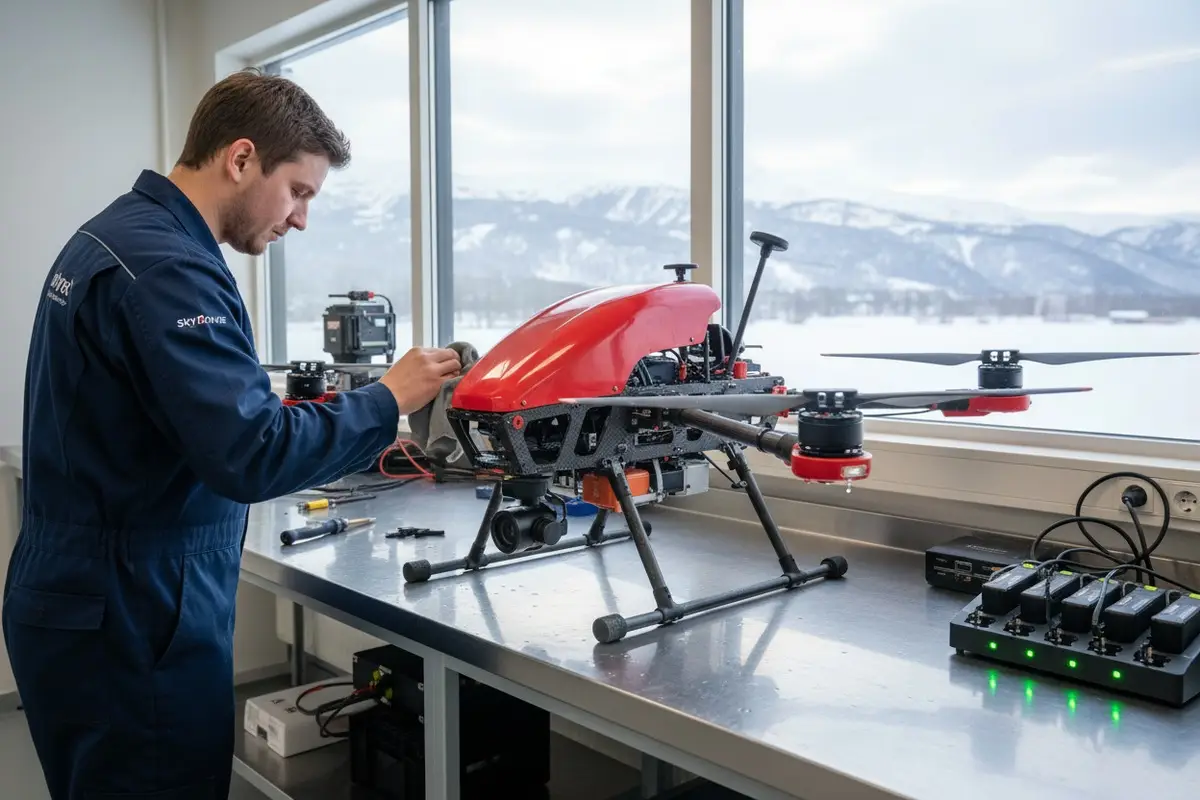

Jedes Mal, wenn unsere Produktionslinie ein Feuerlösch-Drohne 1 in raue Winterklimata versendet, wissen wir, dass die eigentliche Herausforderung beginnt, nachdem das Feuer gelöscht ist. Wasser, Eis und gefrierende Temperaturen sind stille Killer für Drohnenelektronik 2 und Batterien.
Die Wartung von Feuerwehrdrohnen bei Regen und Schnee erfordert sofortiges Trocknen nach dem Flug, sorgfältige Lagerung der Batterien in temperaturkontrollierten Umgebungen, regelmäßige Inspektion wasserdichter Dichtungen und Korrosionsschutzbehandlungen nach jedem Einsatz. Diese Schritte schützen die interne Elektronik, verlängern die Batterielebensdauer und gewährleisten eine zuverlässige Leistung während kritischer Notfalleinsätze.
Dieser Leitfaden führt Sie durch die genauen Wartungsroutinen, die unsere Ingenieure empfehlen wasserdichte Dichtungen 3. Egal, ob Sie im Regen des Pazifischen Nordwestens oder in Schneestürmen der Rocky Mountains operieren, diese Praktiken halten Ihre Flotte einsatzbereit.
Wie reinige und trockne ich meine Feuerwehrdrohne nach dem Einsatz bei starkem Regen?
Wenn wir unsere Flugsteuerungen vor dem Versand kalibrieren, betonen wir den Kunden immer eines: Was Sie in den ersten 30 Minuten nach einem nassen Flug tun, bestimmt die Lebensdauer Ihrer Drohne. Regenexposition ist bei der Brandbekämpfung unvermeidlich, Wasserschäden jedoch nicht.
Nach schweren Regeneinsätzen schalten Sie Ihre Feuerwehrdrohne sofort aus, entfernen Sie den Akku und bringen Sie das Fluggerät an einen trockenen, überdachten Ort. Blasen Sie mit Druckluft Wasser aus Motoren, Lüftungsschlitzen und Anschlüssen. Wischen Sie alle Oberflächen mit Mikrofasertüchern ab und lassen Sie sie 24 Stunden an der Luft trocknen, bevor Sie sie wieder fliegen oder lagern.

Warum Geschwindigkeit zählt
Wasser verursacht keinen sofortigen Schaden. Das Problem sind Korrosion und Kurzschlüsse, die sich über Stunden entwickeln. Mineralien im Regenwasser hinterlassen Rückstände auf den Leiterplatten. Wenn Sie eine nasse Drohne eingeschaltet lassen oder ohne Trocknung lagern, erzeugen diese Mineralien leitfähige Pfade zwischen den Komponenten.
Unser Ingenieurteam testete Drohnen, die unterschiedlich lange nass blieben. Diejenigen, die innerhalb von 30 Minuten getrocknet wurden, zeigten keine Verschlechterung. Diejenigen, die über Nacht blieben, zeigten sichtbare Korrosion an den Motorwicklungen und Gimbal-Anschlüssen.
Schritt-für-Schritt-Reinigungsprozess
Befolgen Sie diese Reihenfolge jedes Mal:
- Landen Sie, wenn möglich, in einem geschützten Bereich
- Sofort ausschalten
- Entfernen Sie zuerst den Akku
- Kippen Sie die Drohne, um Wasser aus den Öffnungen abzulassen
- Verwenden Sie Druckluft 4 an Motoren, USB-Anschlüssen und Lüftungsschlitzen
- Wischen Sie den Rahmen mit fusselfreien Mikrofasertüchern ab
- Entfernen Sie die Kamera und das Gimbal, falls abnehmbar
- Legen Sie alle Komponenten in einen trockenen Raum mit guter Belüftung
Empfohlene Trocknungswerkzeuge
| Werkzeug | Zweck | Anmerkungen |
|---|---|---|
| Druckluftdose | Blasen Sie Wasser aus engen Stellen | Verwenden Sie kurze Stöße, keine kontinuierlichen Ströme |
| Mikrofasertücher | Oberflächenfeuchtigkeit aufsaugen | Vermeiden Sie Papiertücher, die Fasern hinterlassen |
| Silicagel-Päckchen | Umgebungsfeuchtigkeit absorbieren | Während der Lagerung in der Nähe der Drohne platzieren |
| Tragbarer Luftentfeuchter | Raumfeuchtigkeit kontrollieren | Ideal für permanente Trocknungsstationen |
| Weiche Bürste | Schmutz von Propellern entfernen | Nicht auf Linsen oder Sensoren verwenden |
Richtlinien zur Trocknungszeit
Überstürzen Sie diesen Schritt nicht. Selbst wenn die Drohne trocken aussieht, kann noch Feuchtigkeit im Inneren vorhanden sein. Nach unserer Erfahrung mit dem Export in die USA haben Kunden, die die richtige Trocknung überspringen, mehr Garantieansprüche.
Bei leichter Regeneinwirkung 12 Stunden warten. Bei starkem Regen oder Untertauchen 24 bis 48 Stunden warten. Verwenden Sie nach Möglichkeit einen Feuchtigkeitsindikator. Einige professionelle Teams verwenden Infrarotthermometer, um nach kalten Stellen zu suchen, die auf eingeschlossenes Wasser hindeuten.
Welche Schritte kann ich unternehmen, um die Leistung des Akkus meiner Drohne bei eisigen Schneebedingungen zu schützen?
Unsere F&E-Abteilung hat Batterien in Klimakammern bis zu minus 20 Grad Celsius getestet. Die Ergebnisse sind eindeutig: Kalte Batterien verlieren schnell an Kapazität und können dauerhaft beschädigt werden, wenn sie im gefrorenen Zustand geladen werden.
Schützen Sie Drohnenakkus bei Minusgraden, indem Sie sie vor dem Flug auf mindestens 20 °C vorwärmen, während des Betriebs isolierte Akkufächer verwenden, die Akkus sofort nach der Landung entfernen und sie in temperaturkontrollierten Kisten lagern. Laden Sie niemals einen kalten Akku auf, da dies zu irreversiblen Zellschäden und Kapazitätsverlust führt.

Wie Kälte Lithiumbatterien beeinflusst
Lithium-Polymer-Akkus 5 sind auf chemische Reaktionen angewiesen. Kälte verlangsamt diese Reaktionen. Bei 0 °C ist mit 20 Prozent weniger Flugzeit zu rechnen. Bei minus 10 °C sinkt die Kapazität um 30 bis 40 Prozent. Unter minus 20 °C kann die Batterie sich weigern, genügend Strom für den Start zu liefern.
Schlimmer noch, das Laden einer kalten Batterie verursacht Lithium-Plattierung an der Anode. Dies reduziert die Kapazität dauerhaft und birgt Risiken für interne Kurzschlüsse.
Vorflug-Aufwärmmethoden
Wärmen Sie Ihre Batterien vor Wintereinsätzen mit sicheren Methoden auf:
- Lagern Sie Batterien bis zum Start in einem beheizten Fahrzeug
- Verwenden Sie Handwärmer in isolierten Taschen
- Investieren Sie in Batterie-Aufwärmstationen
- Bewahren Sie Ersatzbatterien nah am Körper auf
Unser Produktionsteam fügt jeder Batterielieferung thermische Daten bei. Wir empfehlen unseren Kunden, niemals mit Batterien unter 15 °C Innentemperatur zu fliegen.
Temperaturschwellen für den Batteriebetrieb
| Temperaturbereich | Flugempfehlung | Laden erlaubt |
|---|---|---|
| Über 20 °C | Normaler Betrieb | Ja |
| 10°C bis 20°C | Reduzierte Flugzeit erwartet | Ja, genau beobachten |
| 0°C bis 10°C | Nur kurze Einsätze | Warten, bis der Akku sich erwärmt hat |
| Unter 0°C | Not recommended | Niemals kalte Akkus aufladen |
Akku-Management während des Fluges
Kalte Luft, die während des Fluges über den Akku strömt, kann dessen Temperatur weiter senken. Einige Betreiber verwenden isolierte Akkuabdeckungen oder interne Heizsysteme. High-End-Modelle wie die DJI Matrice 300 RTK verfügen über selbstheizende Akkus, aber selbst diese benötigen eine anfängliche Erwärmung.
Überwachen Sie die Akkutemperatur während des Fluges per Telemetrie. Wenn die Temperatur unter sichere Grenzwerte fällt, landen Sie sofort. Ignorieren Sie Warnungen bei niedrigen Temperaturen nicht.
Akku-Pflege nach dem Flug
Befolgen Sie nach Schneeeinsätzen diese Schritte:
- Entfernen Sie den Akku sofort nach der Landung
- Legen Sie ihn in eine isolierte Hülle
- Lassen Sie ihn sich natürlich auf Raumtemperatur erwärmen
- Auf Feuchtigkeit oder Frost prüfen
- Nur laden, wenn 20°C erreicht sind
Wenn wir an Kunden in kalten Klimazonen in Europa versenden, legen wir isolierte Batteriegehäuse als Teil unseres Standardpakets bei. Diese kleine Investition verhindert kostspielige Batteriewechsel.
Wie inspiziere ich die wasserdichten Dichtungen meiner Industriedrohne, um interne Feuchtigkeitsschäden zu vermeiden?
In unserem Werk in Xi'an prüft die Qualitätskontrolle jede Dichtung vor dem Versand. Dichtungen verschlechtern sich jedoch mit der Zeit, insbesondere bei wiederholter Einwirkung von Regen, UV-Licht und Temperaturschwankungen. Zu wissen, wie man sie selbst überprüft, ist unerlässlich.
Überprüfen Sie wasserdichte Dichtungen visuell auf Risse, Lücken oder Verfärbungen an Luken, Batteriefächern und Kabelanschlüssen. Drücken Sie sanft auf die Dichtungen, um deren Flexibilität zu testen – spröde oder harte Dichtungen müssen ersetzt werden. Verwenden Sie eine helle Taschenlampe, um Lücken zu erkennen, und führen Sie Inspektionen nach jeder fünften Mission bei nassem Wetter oder monatlich während der Regenzeit durch.

Verständnis von IP-Schutzarten
IP-Einstufungen 6 Ihnen mitteilen, welchem Wassereinwirkungsgrad eine Drohne standhalten kann. Dies ist wichtig für die Priorisierung der Inspektion.
| IP-Bewertung | Wasserbeständigkeitsgrad | Gängige Drohnenmodelle |
|---|---|---|
| IPX4 | Spritzwassergeschützt aus allen Richtungen | DJI Mavic 3 Enterprise |
| IP45 | Geschützt gegen Wasserstrahlen | DJI Matrice 300 RTK |
| IP53 | Geschützt gegen Spritzwasser | Parrot Anafi USA |
| IP67 | Tauchfähig bis 1 Meter für 30 Minuten | HexH2O Pro V2 |
Selbst IP67-Drohnen haben Grenzen. Dichtungen verschleißen. Eine einzige gerissene Dichtung kann Wasser an allen anderen Schutzvorrichtungen vorbeilassen.
Wichtige Inspektionspunkte
Konzentrieren Sie Ihre Inspektionen auf diese Bereiche:
- Dichtungen der Akkufachklappe
- Dichtungen der Motorbefestigung
- Dichtungen des Kameragimbal-Gehäuses
- Abdeckungen der USB- und Ladeanschlüsse
- Dichtungen der Antennenbasis
- Nähte und Verbindungen des Hauptgehäuses
Visuelle Inspektionsmethode
Verwenden Sie eine helle LED-Taschenlampe im Winkel. Dies hebt Risse und Lücken hervor, die bei normalem Licht unsichtbar sind. Achten Sie auf:
- Weißliche oder gräuliche Verfärbungen auf schwarzen Gummidichtungen
- Sichtbare Risse oder Spalten
- Dichtungen, die sich vom Gehäuse gelöst haben
- Kompressionsspuren, die nicht zurückfedern
Physische Dichtungsprüfung
Drücken Sie vorsichtig mit dem Finger auf die Dichtungen. Frische Dichtungen sind weich und flexibel. Alte oder beschädigte Dichtungen fühlen sich hart oder spröde an. Sie kehren nach dem Drücken möglicherweise nicht in ihre Form zurück.
Für kritische Bereiche verwenden einige Betreiber einen feuchten Wattestäbchen um die Außenseite der Dichtungen und prüfen dann im Inneren des Fachs auf Feuchtigkeitstransfer.
Zeitplan für den Dichtungswechsel
Unser technisches Support-Team empfiehlt diesen Zeitplan:
- Leichte Nutzung in trockenen Klimazonen: Jährliche Inspektion
- Moderate Nutzung bei nassem Wetter: Inspektion alle 3 Monate
- Betrieb bei starkem Regen oder Schnee: Monatliche Inspektion
- Nach jeglicher Untertauchung oder starkem Regen: Sofortige Inspektion
Wir führen Ersatzdichtungskits für alle unsere Drohnenmodelle. Dichtungen sind im Vergleich zu wasserbeschädigten Flugsteuerungen oder Kameras preiswert.
Welche spezifische Wartungsroutine sollte ich befolgen, um Korrosion nach Winter-Brandbekämpfungseinsätzen vorzubeugen?
Bei der Entwicklung unserer Feuerwehrdrohnen wählen wir Materialien für Korrosionsbeständigkeit 7. aus. Aber kein Material ist immun. Salz von Straßenbehandlungen, Mineralien von Feuerlöschmitteln 8, und saure Verbindungen von Rauch beschleunigen die Korrosion.
Verhindern Sie Korrosion nach der Winterbrandbekämpfung, indem Sie alle freiliegenden Metalloberflächen mit destilliertem Wasser reinigen, Korrosionsschutzsprays oder Nanobeschichtungen auf Steckverbinder und Motorgehäuse auftragen, bewegliche Teile mit silikonbasierten Produkten schmieren und Drohnen in trockenen Umgebungen mit einer Luftfeuchtigkeit unter 50 Prozent lagern. Überprüfen Sie während der aktiven Wintersaison wöchentlich auf frühe Korrosionsanzeichen.

Warum Winter-Brandbekämpfung zusätzliche Korrosion verursacht
Winterbrände schaffen eine raue chemische Umgebung. Rauch enthält Schwefelverbindungen, die bei Feuchtigkeit sauer werden. Schnee und Eis können Straßensalz enthalten. Feuerlöschmittel hinterlassen Rückstände. In Kombination mit Frost-Tau-Zyklen sind Metallkomponenten ständigem Angriff ausgesetzt.
Unsere Testdrohnen zeigten in Feldversuchen innerhalb von zwei Wochen nach ungeschütztem Wintereinsatz sichtbare Korrosion. Drohnen mit ordnungsgemäßer Wartung zeigten nach drei Monaten keine Verschlechterung.
Vollständiges Reinigungsprotokoll nach Missionen
Befolgen Sie diese Routine nach jeder Winter-Brandbekämpfungsmission:
- Akku und Speicherkarten entfernen
- Zugängliche Oberflächen mit destilliertem Wasser abspülen
- Mit sauberen Mikrofasertüchern abwischen
- Druckluft auf Motoren und Lüftungsschlitze auftragen
- Alle Metallverbinder inspizieren
- Korrosionsschutzspray auf freiliegendes Metall auftragen
- Propellerhalterungen und Kardanwellen schmieren
- An einem trockenen, temperaturkontrollierten Ort lagern
Empfohlene Korrosionsschutzprodukte
| Produkttyp | Anwendungsbereich | Wiederholungsfrequenz |
|---|---|---|
| Dielektrisches Fett | Elektrische Steckverbinder | Nach jeder nassen Mission |
| Nano-hydrophobes Spray | Rahmen- und Gehäuseoberflächen | Monatlich |
| Silikon-Schmiermittel | Propellerhalterungen, Kardanwellen | Zweiwöchentlich während des aktiven Gebrauchs |
| Kontaktreiniger | Batterieanschlüsse, USB-Anschlüsse | Nach Exposition gegenüber Rauch oder Chemikalien |
| Korrosionsschutzspray | Motorgehäuse, Metallarme | Nach jedem Wintereinsatz |
Früherkennung von Korrosion
Korrosion frühzeitig erkennen, bevor sie zu Ausfällen führt:
- Weißes oder grünes Pulver auf Aluminiumoberflächen
- Verfärbte oder angefressene Metallverbinder
- Steife oder quietschende Propellerhalterungen
- Unterbrochene elektrische Verbindungen
- Ungewöhnliche Motorgeräusche beim Start
Vorbereitung für die Langzeitlagerung
Wenn Sie Drohnen nach der Wintersaison über längere Zeit lagern:
- Führen Sie die vollständige Reinigung wie oben beschrieben durch
- Entladen Sie die Akkus auf 50 Prozent
- Tragen Sie frischen Korrosionsschutz auf
- In luftdichten Behältern mit Silicagel aufbewahren
- Während der Lagerung monatlich überprüfen
Unsere Kunden, die diese Routinen befolgen, berichten von Drohnenlebensdauern, die 40 bis 60 Prozent länger sind als bei denen, die die Korrosionsschutzmaßnahmen überspringen. Die Investition in die Wartung ist gering im Vergleich zu den Ersatzkosten.
Erstellung eines Wartungsplans
Erstellen Sie einen Kalender für Ihr Team:
- Täglich: Sichtprüfung, grundlegendes Abwischen
- Nach jedem nassen Einsatz: Vollständiges Reinigungs- und Trocknungsprotokoll
- Wöchentlich während der aktiven Saison: Dichtungsprüfung, Korrosionsprüfung
- Monatlich: Korrosionsschutzbehandlung, Schmierung
- Vierteljährlich: Umfassende Inspektion, Dichtungsersatz bei Bedarf
- Jährlich: Professioneller Service und Neukalibrierung
Schlussfolgerung
Die Wartung von Feuerwehrdrohnen bei rauen Wetterbedingungen schützt Ihre Investition und gewährleistet die Einsatzbereitschaft. Befolgen Sie diese Reinigungs-, Batterie-, Dichtungs- und Korrosionsroutinen konsequent. Ihre Drohnen werden zuverlässig funktionieren, wenn Notfälle dies am dringendsten erfordern.
Fußnoten
1. Diskutiert die Anwendung und die Vorteile der Feuerwehrdrohnentechnologie. ︎
2. Beschreibt elektronische Komponenten und wasserdichte Methoden für Drohnen. ︎
3. Bietet einen umfassenden Überblick über wasserdichte Dichtungen und ihre Anwendungen. ︎
4. Erklärt die sichere und effektive Verwendung von Druckluft zur Reinigung von Elektronik. ︎
5. Erklärt das Funktionsprinzip und die Eigenschaften von Lithium-Polymer-Akkus. ︎
6. Wikipedia-Artikel mit einer detaillierten Erklärung von IP-Codes (Ingress Protection) und ihrer Bedeutung. ︎
7. Definiert Korrosionsbeständigkeit und ihre Bedeutung in der Materialwissenschaft. ︎
8. Erklärt die chemische Zusammensetzung verschiedener Feuerlöschmittel. ︎
 English
  Español de México
  Deutsch
  Français
  Русский
  العربية
Comments
No comments yet. Be the first to share your thoughts!
Leave a Comment